

port forward help
- Thread starter Dylan55
- Start date
You are using an out of date browser. It may not display this or other websites correctly.
You should upgrade or use an alternative browser.
You should upgrade or use an alternative browser.
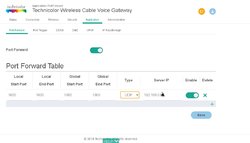


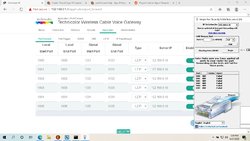
Make sure you are forwarding to the correct IP. Also, port forwarding requires a router reboot sometimes, depending on the manufacturer.
i ran program to see if firewall is blocking anything and here are results.
canning...
Date: 6/21/2020 Time: 5:54:27 PM
''''''''''''''''''''''''''''''''''''''''''''''''''''''''
''''''''''''''''''''''''''''''''''''''''''''''''''''''''
HKEY_LOCAL_MACHINE\System\CurrentControlSet\Services\DusmSvc
--Description: @%SystemRoot%\System32\dusmsvc.dll,-2
--DisplayName: @%SystemRoot%\System32\dusmsvc.dll,-1
--ImagePath: C:\Windows\System32\svchost.exe -k LocalServiceNetworkRestricted -p
''''''''''''''''''''''''''''''''''''''''''''''''''''''''
''''''''''''''''''''''''''''''''''''''''''''''''''''''''
HKEY_LOCAL_MACHINE\System\CurrentControlSet\Services\icssvc
--Description: @%SystemRoot%\System32\tetheringservice.dll,-4098
--DisplayName: @%SystemRoot%\System32\tetheringservice.dll,-4097
--ImagePath: C:\Windows\system32\svchost.exe -k LocalServiceNetworkRestricted -p
''''''''''''''''''''''''''''''''''''''''''''''''''''''''
''''''''''''''''''''''''''''''''''''''''''''''''''''''''
HKEY_LOCAL_MACHINE\System\CurrentControlSet\Services\Wcmsvc
--Description: @%SystemRoot%\System32\wcmsvc.dll,-4098
--DisplayName: @%SystemRoot%\System32\wcmsvc.dll,-4097
--ImagePath: C:\Windows\system32\svchost.exe -k LocalServiceNetworkRestricted -p
''''''''''''''''''''''''''''''''''''''''''''''''''''''''
''''''''''''''''''''''''''''''''''''''''''''''''''''''''
HKEY_LOCAL_MACHINE\System\CurrentControlSet\Services\wlpasvc
--Description: @%SystemRoot%\system32\lpasvc.dll,-1001
--DisplayName: @%SystemRoot%\system32\lpasvc.dll,-1000
--ImagePath: C:\Windows\system32\svchost.exe -k LocalServiceNetworkRestricted -p
''''''''''''''''''''''''''''''''''''''''''''''''''''''''
Done, Scan Complete.
canning...
Date: 6/21/2020 Time: 5:54:27 PM
''''''''''''''''''''''''''''''''''''''''''''''''''''''''
''''''''''''''''''''''''''''''''''''''''''''''''''''''''
HKEY_LOCAL_MACHINE\System\CurrentControlSet\Services\DusmSvc
--Description: @%SystemRoot%\System32\dusmsvc.dll,-2
--DisplayName: @%SystemRoot%\System32\dusmsvc.dll,-1
--ImagePath: C:\Windows\System32\svchost.exe -k LocalServiceNetworkRestricted -p
''''''''''''''''''''''''''''''''''''''''''''''''''''''''
''''''''''''''''''''''''''''''''''''''''''''''''''''''''
HKEY_LOCAL_MACHINE\System\CurrentControlSet\Services\icssvc
--Description: @%SystemRoot%\System32\tetheringservice.dll,-4098
--DisplayName: @%SystemRoot%\System32\tetheringservice.dll,-4097
--ImagePath: C:\Windows\system32\svchost.exe -k LocalServiceNetworkRestricted -p
''''''''''''''''''''''''''''''''''''''''''''''''''''''''
''''''''''''''''''''''''''''''''''''''''''''''''''''''''
HKEY_LOCAL_MACHINE\System\CurrentControlSet\Services\Wcmsvc
--Description: @%SystemRoot%\System32\wcmsvc.dll,-4098
--DisplayName: @%SystemRoot%\System32\wcmsvc.dll,-4097
--ImagePath: C:\Windows\system32\svchost.exe -k LocalServiceNetworkRestricted -p
''''''''''''''''''''''''''''''''''''''''''''''''''''''''
''''''''''''''''''''''''''''''''''''''''''''''''''''''''
HKEY_LOCAL_MACHINE\System\CurrentControlSet\Services\wlpasvc
--Description: @%SystemRoot%\system32\lpasvc.dll,-1001
--DisplayName: @%SystemRoot%\system32\lpasvc.dll,-1000
--ImagePath: C:\Windows\system32\svchost.exe -k LocalServiceNetworkRestricted -p
''''''''''''''''''''''''''''''''''''''''''''''''''''''''
Done, Scan Complete.

Here is a great Guide
https://portforward.com/ports.htm
Just look for Age of Empires Online ... gives you all you need
and in the Beta launcher there is a firewall tool https://forums.projectceleste.com/threads/celeste-launcher-3-0-beta-2-patch-release.4510/
https://portforward.com/ports.htm
Just look for Age of Empires Online ... gives you all you need
and in the Beta launcher there is a firewall tool https://forums.projectceleste.com/threads/celeste-launcher-3-0-beta-2-patch-release.4510/