

Celeste Launcher 3.0 Beta 2 Release

It is a new year, and with that we have also made some progress on the new and redesigned launcher. We received a lot of good feedback from the previous beta and much of it have made its way into the new launcher already. We have now finally reached a milestone in development where all of the planned UI components have received a fresh, new look. Therefore, we think it is time for another beta release where we invite the community to try out the new features in our new and improved launcher.

You can download the new launcher beta release here.

Again, we would want to emphasize this is not a final release of the launcher and it still represents work in progress. We highly appreciate any feedback you provide to us through either the forums, Discord, or on GitHub that lets us improve and fix bugs in the launcher.

Feature Highlight - a new and improved friend list
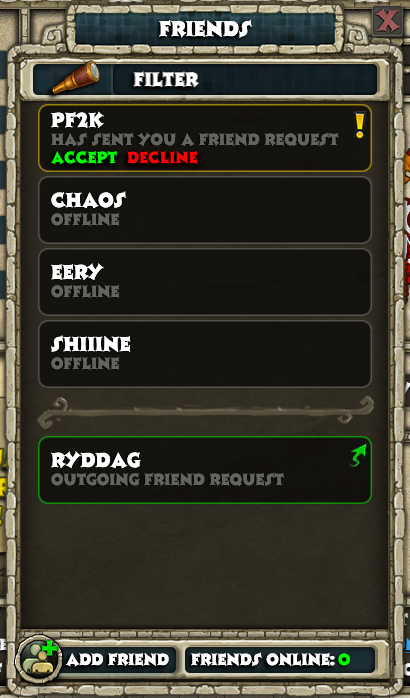
WrYPVKa.png

Some of the dialogs and windows in the launcher can seem quite familiar with the old one. However, with the friend list we decided to start from scratch and build a new one from the ground up. The new friend list contains the same features as the old one, while it will also display an icon next to each online player that is associated with the faction that they are playing. There is also a filter feature which allows you to quickly find whoever you are looking for. For power-users, we also added the ability to search for categories. The following filter queries are supported for each associated category: online, offline, incoming, outgoing.

Changelog
This build extends of the work in the previous beta. This is what is new from the previous beta release:
Redesigned following windows:
  • An entirely new friends list
  • Change password
  • Network interface selector
  • Multiplayer settings
  • Windows Feature helper
  • Windows Firewall helper
  • Steam converter
  • Procdump installer window
Fixed bugs
  • Consistently refer to Celeste website as 'website' (thanks to @SlyCooperFan1)
  • Swapped Item Search with Twitch link (thanks to @TheSpaniard)
  • Fixed an issue preventing underscores in usernames being displayed (thanks to @Ardeshir)
  • Set correct default news image (minor tweak I noticed)
  • Added missing window titles
  • Fixed a bug preventing users from registering with a valid email address
  • Game scanner is more smooth (no more stuttering or frozen window)
  • Show an understandable error message when the user has reached max friend list limit (99) and the user requests another request
Quality of life improvements
  • The player can start the game without using the mouse
  • Better drop shadow on text and UI elements
  • The player now has to select location of spartan.exe instead of the directory of spartan.exe
  • Dialog windows are now grouped together correctly through their owner/parent-property
  • Made some dialog-texts clearer and more understandable
For a full technical overview of other changes, check out the changelog on GitHub.
 
Can't download when clicking "You can download the new launcher beta release here." ... blank page with text "Not found" in top left corner is all I get.
 
That new launcher is really cool. Im sure when its fully released it will be even better but so far I am using it and I do like it!!

Its got everything about AOEO easy to access, 1 click away.
 
Just downloaded it and started using it for the first time, and it functions perfectly! The game scanner is so much smoother and it even uses the taskbar loading progress... :hearteyes: I don't have a lot to add from my previous feedback, but just a couple of notes:
  • As @Abo mentioned in the announcement thread, if you right-click on any input field, the Cut/Copy/Paste commands are very difficult to read. I'm going to also say that the text itself in the input fields is a little hard to read, the dark grey on darker grey doesn't lend itself to readability. Maybe a lighter text color there. But the commands on right-click definitely need to be recolored.
  • The hover on certain elements, like the Game tools icon, the buttons in the Scenario Manager, etc. are also really difficult to read.
  • The links to "Patch Notes", in the logged-in screen and in the game scanner, should maybe point to the actual forum board called Patch Notes, not Announcements :tongueout: though I notice that the Celeste team posts important news in three different boards... patch notes in the patch notes, server maintenance in the announcements, and events in the News board... I suppose the latter is covered by the rotating banner in the launcher, though.
This isn't part of my feedback, but when I try to go through the process to link the game to Steam, it gives me an unexpected error. I figure this is fine because it's a beta, it's not the official launcher, but just thought I should mention it.

All-in-all, I love it. I can't wait for the finished product. Thank you for your hard work!
 
  • Like
Reactions: martinmine
i tried to make an account to a friend of mine using launcher 3, i got invalid email error while creating the new account, i did receive the verification code
i used launcher 2 to register
 
Hi sounds great , I have a question can I run the new beta and the old launcher in case the new one causes issues my current launcher is v2.1.2.0 as a kind of fall back or do I have to use the new Beta exclusively ?
 
You can switch between them but you'll have to extract the Celeste_Launcher.zip again from the older launcher to switch back since the new launcher replaces some files from the old one and they might not be compatible.
 
Hi sounds great , I have a question can I run the new beta and the old launcher in case the new one causes issues my current launcher is v2.1.2.0 as a kind of fall back or do I have to use the new Beta exclusively ?
You can switch between them as you wish, you can even run them both at the same time if you feel like it. As @CWO points out, if you are using the same directory for both the beta and v2.1.2.0, make sure you overwrite all the files and not just the .exe as some of the .dll-files won't work between them (this is why it is a version 3 of the launcher).
 
  • Like
Reactions: Exclusive0r
You can switch between them as you wish, you can even run them both at the same time if you feel like it. As @CWO points out, if you are using the same directory for both the beta and v2.1.2.0, make sure you overwrite all the files and not just the .exe as some of the .dll-files won't work between them (this is why it is a version 3 of the launcher).
Thanks I'll give it a go over the next few days
 
Amazing work; it is a definite improvement, at least visually, and it feels far more informative.
Have not encountered any issues yet, and the sole criticism is the size on screen (stupid I know).
I would prefer the copyright and text on the bottom to have been much smaller, and perhaps to be able to change the size of the window (understandable if that would make buttons smaller). In this regard, there is also a lot of empty space (the celeste logo is wonderful, but the whole window ends up taking up half the screen in height of width) so maybe a compact version where the news and logo were center, then under them the play buttons, version, and smaller warning?

Maybe something like this:
Compactness.jpg
 
  • Like
Reactions: Kulcsos12
Maybe I'm just ignorant... but, can you also post installation instructions? It downloads as a zip folder, but I have no idea where to put the files. Thanks!
 
  • Like
Reactions: ...ReignOfRagnarok