Hi all,
I haven't played the game for a while. I opened up again recently, updated it and it was unplayable because of some graphics bug (I assume). All the other games work fine. I tried downgrading my nvidia driver (to a half year old one. I kept it up to date, so I assumed that might be it) but did not help. I reinstalled the game without avail either. I have seen the game has a config file with all kinds of setting (graphic ones too) because to me it seems like light casting or something is way off somehow. I would really appreciate any help!!
Bug:
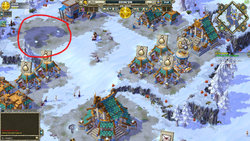
1) Buildings flicker and even disappear sometimes. Scrolling away and back, makes other buildings flicker and other ones disappear.
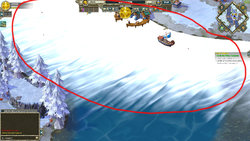
2) Water is white.
Laptop specs:
CPU: Intel(R) Core(TM) i7-7820HK CPU @ 2.90GHz, 2901 Mhz, 4 Core(s), 8 Logical Processor(s)
GPU: NVIDIA GeForce GTX 1080 (driver: 436.48)
AOEO version: v2.1.2.0 (latest)
Any idea what can cause this?
PS: The game is fuckin' amazing and huge kudos to all the devs and artists and everyone involved!
I haven't played the game for a while. I opened up again recently, updated it and it was unplayable because of some graphics bug (I assume). All the other games work fine. I tried downgrading my nvidia driver (to a half year old one. I kept it up to date, so I assumed that might be it) but did not help. I reinstalled the game without avail either. I have seen the game has a config file with all kinds of setting (graphic ones too) because to me it seems like light casting or something is way off somehow. I would really appreciate any help!!
Bug:
1) Buildings flicker and even disappear sometimes. Scrolling away and back, makes other buildings flicker and other ones disappear.
2) Water is white.
Laptop specs:
CPU: Intel(R) Core(TM) i7-7820HK CPU @ 2.90GHz, 2901 Mhz, 4 Core(s), 8 Logical Processor(s)
GPU: NVIDIA GeForce GTX 1080 (driver: 436.48)
AOEO version: v2.1.2.0 (latest)
Any idea what can cause this?
PS: The game is fuckin' amazing and huge kudos to all the devs and artists and everyone involved!