


When playing quests in offline mode, many players will notice that their civ starts off with no gear at worst, or generic gear at best.
This can be changed by loading a .character file. There is an easy way and a hard way to load character files. We will detail the easy way in detail here.
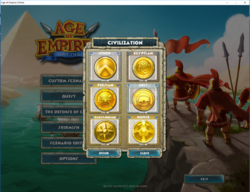
After selecting the quest you wish to play with the "Quest" button, when the civilization menu (shown below) comes up, press the "OTHER" button.
Once the "Other" button comes up, by default, the player will have access to all of the .character files used in the main game (shown below) <!--Note, two custom .character files are shown in the image below-->.
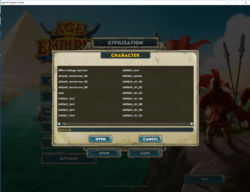
This can be a little overwhelming to look at and scan through, so here's a breakdown of each character file name and what it means:
"A1" is Alliance 1, "A3" is alliance 3
=== BOOSTER ===
"B1" is Defense of Crete (Booster 1), "B2" is the Skirmish hall, "B3" is the Fertile Crescent, and "B4" is the Northern Invasion
=== CIVILIZATION ===
"C1" is the Greeks, "C2" is the Egyptians, "C3" is the Celts, "C4" is the Persians, "C6" is the Babylonians, "C7" is the Norse. Note, C5 is unused.
So, let's say you want to play as the Greeks with level 40 gear. Generally, selecting the Skirmish .character data would not be a bad choice.
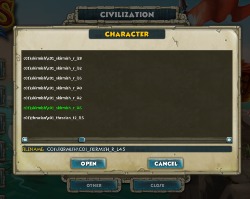
Selecting c01\skirmish\c01_skirmish_r_!40 will give you gear equal to a level 40 skirmish opponent (42 and 45 are higher gear stats, as well as higher level. These are intended for the enemy AI to compensate for AI limitations).
=== What do the names mean? ===
Let's use the level 15 Thracians as an example
c01\thracian\c01_thracian_t2_l15
c01 = Greek
thracian = sub group of civilization (except "_core", that means default, so in this case default Greeks or "core greeks")
c01 = a second reference to what civ this file belongs to
_ = separation without using a space (something file names should not have for games)
thracian = this one refers to the type of AI that can use this gear. Not important for a player but does denote a variation of gear between types of AI -- the focus of the gear
_ = again, separation
l15 = lower case "L" for "level", meaning level 15. Some .character files will have a "e_" before this, which is in reference to gear for "Epic Quest variants of the same .character profile.
== Closing Note ==
It is highly recommended to download a custom character file, as the ones in the default game are often missing gear (on purpose), like building construction accessories.
As usual, thanks to Musictopia for his assistance in making this guide.
This can be changed by loading a .character file. There is an easy way and a hard way to load character files. We will detail the easy way in detail here.
After selecting the quest you wish to play with the "Quest" button, when the civilization menu (shown below) comes up, press the "OTHER" button.
Once the "Other" button comes up, by default, the player will have access to all of the .character files used in the main game (shown below) <!--Note, two custom .character files are shown in the image below-->.
This can be a little overwhelming to look at and scan through, so here's a breakdown of each character file name and what it means:
- The first letter determines what it is from
- The second number reflects the release order
"A1" is Alliance 1, "A3" is alliance 3
=== BOOSTER ===
"B1" is Defense of Crete (Booster 1), "B2" is the Skirmish hall, "B3" is the Fertile Crescent, and "B4" is the Northern Invasion
=== CIVILIZATION ===
"C1" is the Greeks, "C2" is the Egyptians, "C3" is the Celts, "C4" is the Persians, "C6" is the Babylonians, "C7" is the Norse. Note, C5 is unused.
So, let's say you want to play as the Greeks with level 40 gear. Generally, selecting the Skirmish .character data would not be a bad choice.
Selecting c01\skirmish\c01_skirmish_r_!40 will give you gear equal to a level 40 skirmish opponent (42 and 45 are higher gear stats, as well as higher level. These are intended for the enemy AI to compensate for AI limitations).
=== What do the names mean? ===
Let's use the level 15 Thracians as an example
c01\thracian\c01_thracian_t2_l15
c01 = Greek
thracian = sub group of civilization (except "_core", that means default, so in this case default Greeks or "core greeks")
c01 = a second reference to what civ this file belongs to
_ = separation without using a space (something file names should not have for games)
thracian = this one refers to the type of AI that can use this gear. Not important for a player but does denote a variation of gear between types of AI -- the focus of the gear
_ = again, separation
l15 = lower case "L" for "level", meaning level 15. Some .character files will have a "e_" before this, which is in reference to gear for "Epic Quest variants of the same .character profile.
== Closing Note ==
It is highly recommended to download a custom character file, as the ones in the default game are often missing gear (on purpose), like building construction accessories.
As usual, thanks to Musictopia for his assistance in making this guide.
Last edited:

