

impossible connection
- Thread starter galyfa
- Start date
You are using an out of date browser. It may not display this or other websites correctly.
You should upgrade or use an alternative browser.
You should upgrade or use an alternative browser.
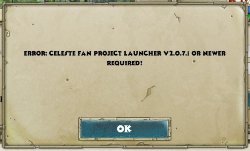

Try installing the latest Launcher if you dont have it
https://github.com/ProjectCeleste/Celeste_Launcher/releases/download/v2.0.7.1/Celeste_Launcher.zip
Be sure to use Game Scan afterwards
https://github.com/ProjectCeleste/Celeste_Launcher/releases/download/v2.0.7.1/Celeste_Launcher.zip
Be sure to use Game Scan afterwards

Oh thank you very much, the game is working again ; ) On the other hand, when I want to play a network with a friend, I can invite him, he appears well in the game but when I want to start a game the game does not start. (I authorized the firewall windows) Is there a setting to do please?
I have this as default settings.
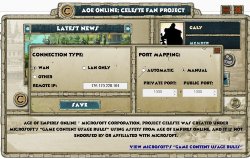
I have this as default settings.

If you're trying to play with a friend online you need to open ports 1000 to 1005 on your router. Your current WAN setting and Port Mapping settings in menu are fine. If you're trying to play with a friend over LAN you need to set the mode to LAN-only.
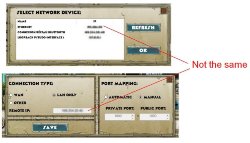

Because one's an internal address for LAN and the other an external address for WAN. Both of you just need to select LAN and the ip address under ethernet in the menu that pops up.
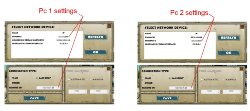
Click save and you're right to LAN with one another. Theres a different IP for each pc on the network.
Doing it over hamachi is very similar to doing it over LAN for your own network at home, even when doing hamachi games with people not on the same physical network. I use it when I'm having problems getting 2v2's to start with lobbies of people that do 1v1 on the ladder over WAN normally.
You want to have hamachi installed first like the pc2 picture. Set AOEO to LAN mode once you have hamachi installed and this time both of you click on your hamachi ip that pops up. Save this. Now both of you need to go into hamachi and join a network, any network, as long as you're both on it (usually I'd just create one).
Let me know how this goes, because I'm not sure what else you can do if you have been having problems on LAN even after opening the ports on windows firewall (on the router isn't necessary for LAN, and you'd only be able to forward to 1 pc, and AFAIK port triggering to do multiple at once doesn't work)
You want to have hamachi installed first like the pc2 picture. Set AOEO to LAN mode once you have hamachi installed and this time both of you click on your hamachi ip that pops up. Save this. Now both of you need to go into hamachi and join a network, any network, as long as you're both on it (usually I'd just create one).
Let me know how this goes, because I'm not sure what else you can do if you have been having problems on LAN even after opening the ports on windows firewall (on the router isn't necessary for LAN, and you'd only be able to forward to 1 pc, and AFAIK port triggering to do multiple at once doesn't work)
Without Hamachi? No. Only one of you at a time can play with the non-local friend using port-forwarding. To my knowledge port triggering isn't supported.
With Hamachi? Yes. Set up all 3 pcs as LAN-hamachi, and join a hamachi network together and you're good to go.
With Hamachi? Yes. Set up all 3 pcs as LAN-hamachi, and join a hamachi network together and you're good to go.
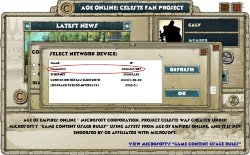
And join/create a network on hamachi together, you all need to be online in the network in hamachi, but yes, that's all you have to do in the celeste client.
When is this happening? Trying to get into the game from the client? Or are you being booted off mid game? Or not able to start a new map?

Check your internet, sounds like a timeout and reset at the network level. Happens to me when my provider resets my IP, now I know when they do it so I play around it. You get "server unavailable" if your internet goes down or gets reset.