Game won't launch

Volatile

Spearman
Jan 21, 2018
7
0
1
Canada
I could launch and play the game in multiplayer with the previous launcher, since the new launcher replaced the old one I get this error after the game file check when I press Play:
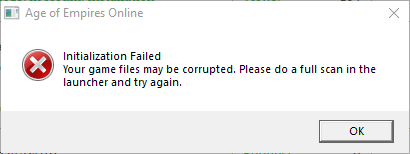
Capture.PNG


Already tried:
- Everything on Reddit article troubleshoot section. (I uninstalled every one of them and reinstalled them)
- Disable/re-enable DirectPlay.
- Full reinstall of the game.
- Disabling my antivirus.
- Compatibility mode.
- Launch as admin.

I'm on a Windows 10.

Does anyone have any ideas what is going on?
 
Does the "GameScan" complete with the success message or the error one ?
Wich version of the launcher do you use ?
I am using the latest version (v2.0.2.0).
The game scan completes with no errors. It prompts a success message.
 
May you give a status update, please?

This issue has illuded me for a while. I do not know of a fix, nor does anyone I believe. Some possible causes are:

Issue with the .net framework. Try reinstalling it.
File/Folder permissions and/or antivirus. Disable your antivirus and see if it works, if it does, add exclusions for the game files/folders.
 
This issue has illuded me for a while. I do not know of a fix, nor does anyone I believe. Some possible causes are:

Issue with the .net framework. Try reinstalling it.
File/Folder permissions and/or antivirus. Disable your antivirus and see if it works, if it does, add exclusions for the game files/folders.

I did these. I removed all .net modules and installed them again. I also added exclusions for game files & folder. Not helping, unfortunately.

I want to emphasise again that with the old launcher of yours, I could launch the game. This issue came with the new launcher.

I hope you guys can figure out the source of the issue. I would love to be able to play this game again.
 
I am not sure that it is because of the recent updates. This error has happened before too. Maybe something else on your PC changed at the same time?
 
I am not sure that it is because of the recent updates. This error has happened before too. Maybe something else on your PC changed at the same time?
Ah, that is impossible to detect. I change a lot of thing on my PC all the time, so you may be right.

Although as I said, it is not possible for me to say something certain about it.
 
Ah, that is impossible to detect. I change a lot of thing on my PC all the time, so you may be right.

Although as I said, it is not possible for me to say something certain about it.

That is fine, I understand if you cant remember every change you made. I just wanted to bring to attention that it may have been something else like that.


I will also recommend trying this:

Open the windows command prompt. (WIN+R, type `cmd` and hit enter)

Run this command first: `sfc /scannow`
then, after that one completes, run this one: `DISM /Online /Cleanup-Image /CheckHealth`

You might need the command prompt to be in Administrator mode.
 
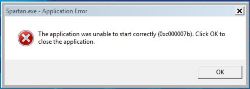
1520863525-error-07b.jpg

I have formatted my PC Friday Night and I have reinstalled the game satursday and I got that.

I have already downloaded 3 times the game through Steam and one time with the Game DDL, same result. I have also just tried to disable my firewall and anti-virus, still that same error window. O/C, the game have been patched to the latest version.

Do you have any idea what's wrong ?
 
View attachment 215

I have formatted my PC Friday Night and I have reinstalled the game satursday and I got that.

I have already downloaded 3 times the game through Steam and one time with the Game DDL, same result. I have also just tried to disable my firewall and anti-virus, still that same error window. O/C, the game have been patched to the latest version.

Do you have any idea what's wrong ?

I have researched that error code, and I've found that reinstalling all versions of the C++ redist, then re-installing with the links from either of the installation tutorials can help.