

It is a new year, and with that we have also made some progress on the new and redesigned launcher. We received a lot of good feedback from the previous beta and much of it have made its way into the new launcher already. We have now finally reached a milestone in development where all of the planned UI components have received a fresh, new look. Therefore, we think it is time for another beta release where we invite the community to try out the new features in our new and improved launcher.
You can download the new launcher beta release here.
Again, we would want to emphasize this is not a final release of the launcher and it still represents work in progress. We highly appreciate any feedback you provide to us through either the forums, Discord, or on GitHub that lets us improve and fix bugs in the launcher.
Feature Highlight - a new and improved friend list
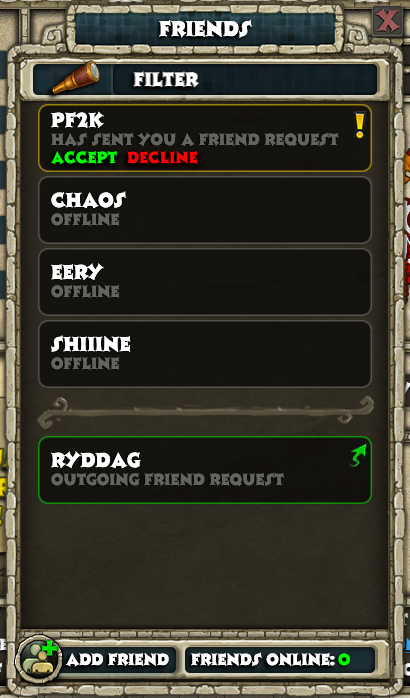
Some of the dialogs and windows in the launcher can seem quite familiar with the old one. However, with the friend list we decided to start from scratch and build a new one from the ground up. The new friend list contains the same features as the old one, while it will also display an icon next to each online player that is associated with the faction that they are playing. There is also a filter feature which allows you to quickly find whoever you are looking for. For power-users, we also added the ability to search for categories. The following filter queries are supported for each associated category: online, offline, incoming, outgoing.
Changelog
This build extends of the work in the previous beta. This is what is new from the previous beta release:
Redesigned following windows:
You can download the new launcher beta release here.
Again, we would want to emphasize this is not a final release of the launcher and it still represents work in progress. We highly appreciate any feedback you provide to us through either the forums, Discord, or on GitHub that lets us improve and fix bugs in the launcher.
Feature Highlight - a new and improved friend list
Changelog
This build extends of the work in the previous beta. This is what is new from the previous beta release:
Redesigned following windows:
- An entirely new friends list
- Change password
- Network interface selector
- Multiplayer settings
- Windows Feature helper
- Windows Firewall helper
- Steam converter
- Procdump installer window
- Consistently refer to Celeste website as 'website' (thanks to @SlyCooperFan1)
- Swapped Item Search with Twitch link (thanks to @TheSpaniard)
- Fixed an issue preventing underscores in usernames being displayed (thanks to @Ardeshir)
- Set correct default news image (minor tweak I noticed)
- Added missing window titles
- Fixed a bug preventing users from registering with a valid email address
- Game scanner is more smooth (no more stuttering or frozen window)
- Show an understandable error message when the user has reached max friend list limit (99) and the user requests another request
- The player can start the game without using the mouse
- Better drop shadow on text and UI elements
- The player now has to select location of spartan.exe instead of the directory of spartan.exe
- Dialog windows are now grouped together correctly through their owner/parent-property
- Made some dialog-texts clearer and more understandable


