Scaling UI

zhony

Villager
Mar 5, 2019
1
3
3
34
Hi, would it be possible to enable some kind of scaling in the user interface and minimap?
I have a big 4K display and the small map and UI make the game very difficult to play.
If not possible to add a slider in the ingame settings, would be great to provide a guide on how to tweak the conf files to increase the size of the elements, even if it's blurry it would be great. (W10 scaling is not a good idea, the game looks great but the GUI is the only problem).
Thanks in advance!
 
As much as I would support that, it is pretty hard to implement that as the scaling code is scatted through the binary.
 
  • Like
Reactions: Ardeshir
I think this is an excellent idea! I was just looking for a workaround to fix the scale in UHD and i saw your post. When i play this game in HD (1920x1080) it glitches all my pc when i need to press alt+tab.
 
I did a workaround guys. But you have to follow in that order, otherwise it will fail. First things first: Open your game, go to options menu, put the resolution to 4096x2160 and mark the "windowed" box.
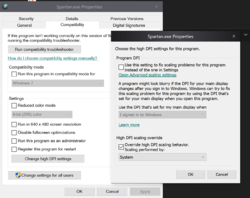
After that, close the game, go to the game directory, find Spartan.exe, go to properties - compatibility settings - change high DPI settings and then change it to exactly how it is in my screenshot:
SnqlzO6.png
(if you cant view my screenshot, mark the "Override high DPI scaling behavior and then select Scalling performed by: System).
Then open your game. The game will open windowed, so you just need to hit ALT+ENTER to go to fullscreen mode. Don't uncheck the option "windowed". If you go to options and see another resolution than 4096x2160, you can change it back to 4096x2160, but you are already in the correct resolution (the box just glitched and showed u a different resolution, but you'll already in 4k).
That's all :)
 
  • Like
Reactions: MatrixSoft
The youtube video works, just have to do it exactly. Make sure to uncheck high dpi scaling override and it will work.