Quest stats button missing

Bradam

Spearman
Sep 22, 2018
10
5
3
46
When I do any mission I have no quest stats button. I didn't even know there was one till someone I ran a co-op mission with told me.

Is the someway to get the button?
 
When I do any mission I have no quest stats button. I didn't even know there was one till someone I ran a co-op mission with told me.

Is the someway to get the button?

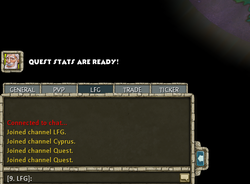
It's not a button, it comes in the form of the village elder picture on the left of your screen. like when those tutorials pop up during missions, and you close them, they go over to the left side above the chat, where you can right click them to dismiss them, or left click to see them again. It shows up like that. You literally click the icon and you can see the stats. Though honestly they aren't too important except to see where your weaknesses and strengths are throughout a game I guess.
 

Attachments

  • Untitled.png
    Untitled.png
    130 KB · Views: 568
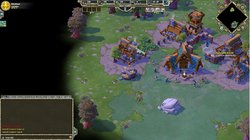
Desktop resolution is 3840 x 2160, I had all kinds of issues trying to run the game in windowed mode and actually be able to read the text. It works ok in "fullscreen" mode which locks me to one moniter and makes the other 2 moniters useless.

That village elder picture I do not have. No buttons over there at all sadly.

 

Attachments

  • No button.jpg
    No button.jpg
    543.1 KB · Views: 579
Oddly enough after todays patch the settings button on the main screen is missing so i can't even check what resolution i have the game set at.
 
So I have seen the button pop after a mission now a whopping twice. All the rest of the missions its never there =(