

net Framework 4.7
- Thread starter Rikkochet
- Start date
You are using an out of date browser. It may not display this or other websites correctly.
You should upgrade or use an alternative browser.
You should upgrade or use an alternative browser.

Have you tried downloading the web installer ?Hello, since the last update i can't connect to celeste launcher because it asks me .net framework 4.7 but it isn't available on my Windows 10 version. How can i fix this ?
What version is your windows 10 ?
Settings>System>About
32 or 64bit, Edition, Version and OS Build
Just doesnt sound right that you cant install it..
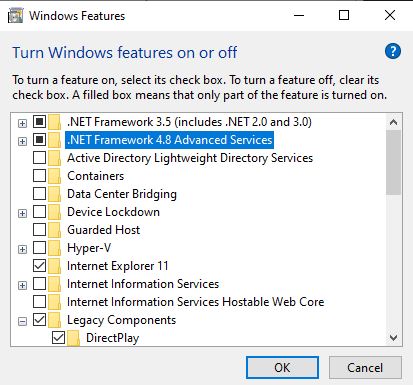
Also look in 'Programs and Features" , then on the left, click "Turn Windows features on or off"
See if its listed there, it might not be enabled..
Settings>System>About
32 or 64bit, Edition, Version and OS Build
Just doesnt sound right that you cant install it..
Also look in 'Programs and Features" , then on the left, click "Turn Windows features on or off"
See if its listed there, it might not be enabled..

I had same with celeste/framework.
I have simply installed framework, restarted pc and fine. But i have win7 running. Cannot know whats wrong with ur OS.
Edit: Looks like to me ur win10 doesnt allow (OS blocking) to install framework. U have to find a way how to add framework into ur OS or change ur Win10. Thats what i see from here... greetz.
I have simply installed framework, restarted pc and fine. But i have win7 running. Cannot know whats wrong with ur OS.
Edit: Looks like to me ur win10 doesnt allow (OS blocking) to install framework. U have to find a way how to add framework into ur OS or change ur Win10. Thats what i see from here... greetz.
Last edited:
I'm not understanding why its not allowing to install it, since its a Microsoft Update.
You may have to either contact someone local you to have a look at it, or contact Microsoft support ..
Ive tried looking to find a solution, but there's no information about this problem, seems no one else has it
You may have to either contact someone local you to have a look at it, or contact Microsoft support ..
Ive tried looking to find a solution, but there's no information about this problem, seems no one else has it
I have the same problem. After the update I am asked for Framework 4.7
I have windows 8 and I tried everything and I can't install that version of Framework or update the one I already have installed
Try this installer
I cant install it, says: This operating system does not support .NET Framework 4.7.2.Try this installer
The same when I try to install other latest versions
Yea, I think you need to update to 8.1 or win 10I cant install it, says: This operating system does not support .NET Framework 4.7.2.
The same when I try to install other latest versions