installation

Robin Andersson

Spearman
Oct 19, 2018
8
0
1
41
Hello!

Im in dire need of help!
When I downloaded the game and followed the guide the launcher gave me this massage:Warning: error during update check: Could not initialize the configuration system.

Do anyone know how to fix this?
 
After you install the game and install the launcher, you will have to run Game Scan, which is in the launchers Tools ..
That will download patches needed to play, patches contain added content, added quests etc....
 
I get the same massage when I try and update the game. I did note that, when I try to login I can´t finde the server IP, ( The firewall don´t block the launcher btw)
 
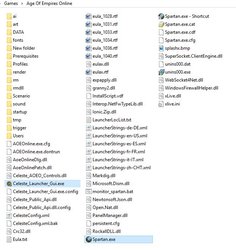
did you place the launchers files in the games folder ?
The launchers files should be in the same directory as spartan.exe

Should look something like this
 

Attachments

  • Capture.JPG
    Capture.JPG
    79.5 KB · Views: 483
By default in windows, the file extension is not shown, you have to set it to show that in options..
Thats not an issue ..
Im stuck as to what the error is, is that error the exact wording ?
 
Fix 3 wont matter, as that doesnt exist with this game ..
Its 2am here, I have to log, if you still need help, I would suggest that you join our Discord (link at the bottom of site) and join channel #Help on the left ..
NCSGeek should be around sometime a little later, he may be able to help if no one else can..
Hopefully using the system file checker will fix it (Fix 1)
You could also try these two commands as well
DISM /Online /Cleanup-Image /ScanHealth
DISM /Online /Cleanup-Image /RestoreHealth