Bug Celeste.exe

LordGalahad

Spearman
Sep 7, 2019
7
0
1
25
Hello, I don't know what's going on with the game, it just doesn't start with celeste.exe, someone could give me a light ... It just starts on Steam, and when it starts it goes into the old lobby, and I put the credentials to access the game, out of nowhere asks for access key, or is loading endlessly !!

Help meeee pliss!!!
 
To make the game start using steam, you must use the launcher first, then go to Tools > Helpers > Steam, to convert the launcher to work in steam..
Regarding the game not starting when pressing play, if you have Kaspersky antivirus, you must close the launcher, then disable Kaspersky, then start launcher and game.. If you have other antivirus, you can go into its options and add the games folder to exceptions, then start launcher and game..

You will also have to update the game (if you havent) using Game Scan, which is in Tools..
That will download patches, which contain added quest and items etc, that we have added to the game
 
  • Like
Reactions: LordGalahad
Thanks for the help, but unfortunately it hasn't solved my situation yet, could you make an explanatory tutorial on how to install the game and start it with celeste.exe? I really want to play this game! but lately I have no time to try other ways, the explanations have been a bit confusing in the middle of the site, if you can do this favor, I would be very grateful...
 
Once the game is installed, you download the latest launcher ,
  • unzip all files and place the files in to the games folder (where the spartan.exe is),
  • you then can double click on the Celeste_Launcher_Gui.exe which will start the launcher,
  • you then run the game scan which is in tools,
  • then create an account from the launcher (NOTE: forum account is not the same as the game account)
Tutorial explains this too.. or was this what was confusing ?
You can also refer to the troubleshoot part of the tutorial if you get file errors

Also there is a Video, the launcher files shown are a little different as the launcher has changed alot, but the basics is the same, dont need to install using the installer if you have installed using Steam
 
  • Like
Reactions: LordGalahad
Thanks for the help friend, but my case has not been solved, I think it's some problem with the region, do you know if the server is available in Brazil? or something from my directory, can you log out of your game account and copy the file directory, upload it to some site and make it available for download to see if that is it? if you can thanks...
 
The game is available to every country, server doesnt block countries..
What exactly is the problem you are having ?
Everything installed fine but cant connect to server ?
 
Sorry, the video quality is not good, but I did my best to put what is really going on. The launcher simply does not start ... Hope you can help me!
 
Looks like when you try starting it, you hit enter when NO is selected when asked to allow the launcher to make changes.. Press Yes instead

Edit
You might find it easier to get answers quicker if you use Discord, theres a link at bottom of site..
Its 1am here and need sleep..
 
Last edited:
I think this case has no solution, I tried everything, but the initiator does not want to open, just shows the mouse indicator that loads later and does not open anything, disappointing, I really wanted to play the game ...
 
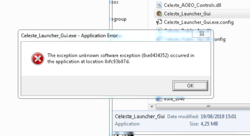
I uninstalled now this error appears to me, what can it be??
 

Attachments

  • mee.PNG
    mee.PNG
    32 KB · Views: 767