UI scale

Talon227

Villager
Jan 8, 2018
1
0
1
42
Would it be possible to add a UI scale slider option? I play at a very high resolution and it makes the minimap and the other UI elements very small and hard to see. Thanks!
 
Would it be possible to add a UI scale slider option? I play at a very high resolution and it makes the minimap and the other UI elements very small and hard to see. Thanks!

This would be nice. There have been a few people with >1920x1080 monitors recently, though I am not sure how easy that would be to implement.
 
I have the same problem and believe that adding a UI scale slider would be really great.
Thanks
 
Hey, sorry for opening up an old thread, but I reckon this is the first one a newcomer stumbles upon searching for a solution to this problem. I know, I did.
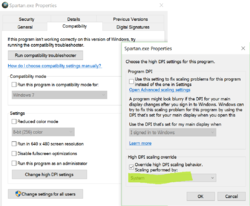
Anyways, to fix this on windows 10, locate the spartan.exe in your gamefiles, go to properties->compatibility->change high DPI settings and change the value under "High DPI scaling override" from application to system.
It's by no means as good as a UI slider would be, but it makes the UI so much more readable on a big screen!

 

Attachments

  • highDPI.PNG
    highDPI.PNG
    90 KB · Views: 979
Hi, sorry for this old thread, but I have the same problem.
I play at 3440x1440 and the UI, especially the text is really small and sometimes barely readable (like every item / technology description)
I tried to change the DPI settings in the spartan.exe, but nothing changed.
Is there another way to change the scale ? Difficult to enjoy the game in that state...
Thanks