

SOLVED ERROR: DOWNLOAD FAILED! V2.0.3.0 TO V2.0.3.1

Merkurial

Villager
Feb 23, 2018
4
2
3
35
Hello everyone :)

I'm trying to play this awesome game but I can't seem to be able to get over the update, I follow all the steps.

I've tried doing the install from Steam and a direct install and none worked.

I removed Kaspersky and installed the game and then tried, still no luck.

Added exclusion in firewall, direct play etc installed.

Any ideas?
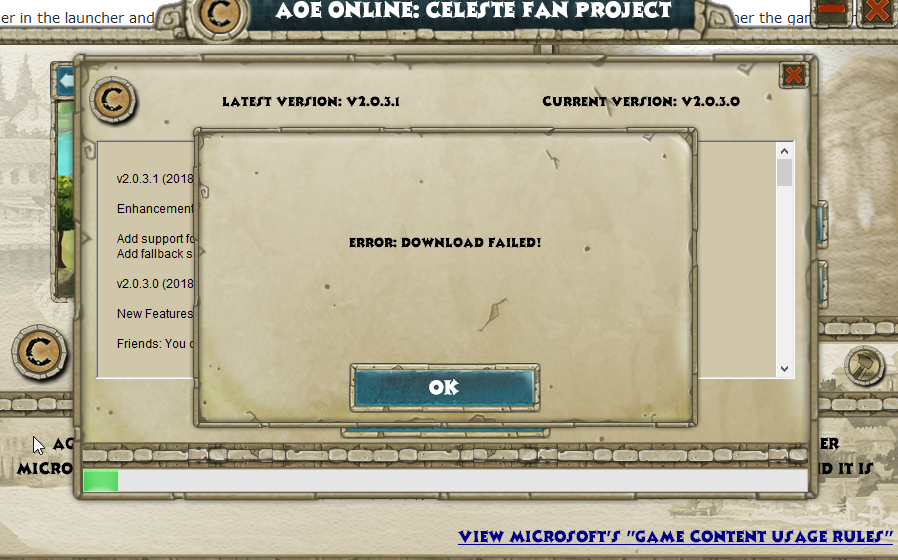
upload_2018-2-23_11-27-47.png
 
Unfortunately it still doesn't work. I've tried uninstalling and reinstalling with the new launcher and it doesn't ask me for an update anymore. When I press play it says the game is damaged and I need to run the scanner. I run the scanner succesfully and when I click play again nothing happens.
 
I had the same issue, got the updated launcher with the new version and the game doesn't launch, the login menu minimizes but nothing else happens.
I downloaded everything last week and still be able to make it launch after trying the different solutions
 
Hi, I'm new too, first of all thank you all for your hard work: it's great to have a chance to play an all time favorite once again after so long!
Unfortunately I'm here to confirm the same issue that the others were saying.
I've tried to uninstall and redownload the game just to be sure that no files were corrupted, but I had no luck.
Can't wait to play!

Cheers!
 
It looks like the game works even without updating the patch on the launcher.

Here's what i did:

- downloaded AOEO from Steam;
- downloaded and extracted the launcher;
- deleted steam_api.dll;
- ran the launcher;
- clicked on the hammer icon > helpers > Steam;
- clicked on the hammer icon again and ran both the scans;
- clicked register, created an account;
- ran the game;

the tricky part for me was the login, because at first I typed my Steam account name and password, but you need to create another account in order to make it run.

I'm still with version 2.0.3.0 and I'm playing right now. I've chosen my civilisation and did a couple of missions. Everything works fine.
 
  • Like
Reactions: Merkurial
the tricky part for me was the login, because at first I typed my Steam account name and password, but you need to create another account in order to make it run.

I'm still with version 2.0.3.0 and I'm playing right now. I've chosen my civilisation and did a couple of missions. Everything works fine.
Steam. Celeste Forum and Game logins are all different..

The game patches must be downloaded.
Having an earlier Launcher may work, but since some features get upgraded like friends list may not work until you upgrade launcher.
Im not sure why some have issues with the launcher when it works fine for me and many other players.
I wish I could get the bug so I could find a solution or the cause..
 
Steam. Celeste Forum and Game logins are all different..

The game patches must be downloaded.
Having an earlier Launcher may work, but since some features get upgraded like friends list may not work until you upgrade launcher.
Im not sure why some have issues with the launcher when it works fine for me and many other players.
I wish I could get the bug so I could find a solution or the cause..

Well since last time I played this game was like four years ago, this patch issue didn't bother me as long as I was able to play the game out of sheer excitement.

However I do want to spread the good news and play it with my friends and I would be concerned if this issue made me unable to do it.

I will check if this works anyways with my friends.

As for now I have to choose between playing 2.0.3.0 or not playing it at all.
 
Here's another thing I've tried:

- uninstalled AOEO via Steam;
- deleted all local files;
- downloaded the 2.0.3.1 patch from the link Wartai gave in the first post;
- unzipped the files;
- opened the launcher and logged in BEFORE downloading the game (this allowed me to display the correct current patch);
- downloaded AOEO via Steam;
- closed Steam;
- opened the launcher again a ran both the scans;
- hammer > helper > Steam;
- launched the game

note: after the scan I clicked "PLAY" and it still said that some file were missing or corrupted and asked me to redo a scan, I clicked "NO" and it ran without problems.

Hope it helps someone!
 
Works for me now as well.

- Disable Antivirus
- Uninstall game + associated folders
- Run CCleaner
- Reinstalled using the standalone version (NOT Steam
- Download Celeste and extracted to install file.
- Logged in and then scan the game
- Works.